|
|
 |
|
Estierra is a
program for modeling the terrain of the earth.
It reads standard USGS Digital Elevation Model
files (DEMs) and converts them into
three-dimensional models of the earth's surface.
These models can be colored, shaded, highlighted
and overlaid with topographic maps or aerial
photographs. This creates extremely realistic 3D
images of the terrain. In addition,
Estierra
uses OpenGL technology that gives it the ability
to do high-speed animations of the terrains.
This means the terrains can be zoomed, panned
and rotated in real-time. You can even fly over
and through the terrain using your mouse.
|
|
Support Materials
|
|
Freeware
Software |
|
 |
|
|
|
|
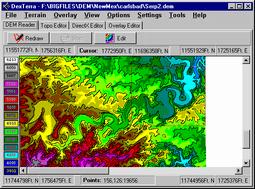 |
DEM Files. Estierra creates terrain
models by reading
Digital Elevation Model (DEM) files that contain grids elevation
points for a particular area. DEM files are readily available
for all the United States from the USGS and several commercial
sites. DEM files are
available in 7.5 minute and one degree versions that correspond
to standard topographic maps.
More Info:
How Estierra
Works. |
|
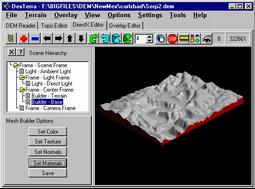 |
3D Models. Information in the DEM files are converted to
smooth models of the surface that show every detail of the
terrain . You have complete control over the appears of the
model surface including color, texture, smoothness, highlight,
shadows, and background color. You can even control the position
of the sun and its angle in the sky. More Info: Building Terrains.
|
|
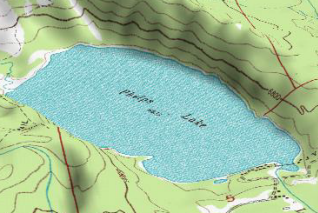 |
Uses for Estierra. Estierra has many uses. Outdoor enthusiast
such as hikers, mountain climbers, cave explorers, horse back
riders, skiers and mountain bike riders can use Estierra to plan
routes and tofamiliarize themselves with the terrain.
Geologist, hydrologists and other earth scientist can use Estierra to analyze
rock formation and various surface features. Civil engineers
can use itfor planning roads,
bridges, parks and buildings. Land Managers can use it to
locate wet lands, estuaries, locate flood planes, avalanche
course and many other land features. More Info: Uses For Estierra |
|
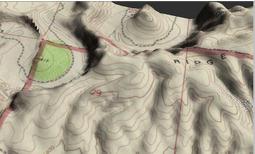 |
Real-time Fly-Over. The terrain models can be moved, rotated
and manipulated in real-time. Because of the high animation
speed, you can turn move, tilt, spin, and zoom the terrain
instantly using the mouse. You can also fly over the terrain as
if you were in an airplane using the mouse or a joystick. In
other words, you can fly down canyons, over peaks and along
rivers, instantly changing direction to get a better view of a
particular aspect of the terrain.
More Info: Animations. |
|
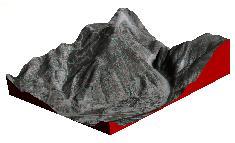 |
Photographic Overlays. The terrains can overlaid with bitmap
images of topo maps, geological, and aerial photographs.
Overlaying with an aerial photograph creates an extremely
realistic image of the terrain. Flying over this kind of terrain
is so realistic that it seems like you are actually seeing the
earth from an airplane.
More Info:
Overylaying Terrains. |
|
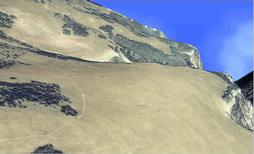 |
High Resolution Photo Overlays. On of the big
advantages of Estierra is that you can overlay
scanned images of photographs that are normally not available in
digital format. Here is an image created from a low level aerial
photograph of the White River Plateau in western Colorado.
More Info:
Photo Overlays. |
|
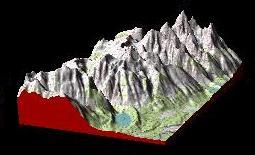 |
Map Overlays. Terrain models can also be overlaid with
topographic and geologic maps. This makes it very easy to find
locations and landmarks. It is also much easier to
visualize subtle features in the terrain. If you are working
with geologic maps, it very easy to see where the various
formations intersect the surface and how the effect the terrain.
Since all overlays are bitmaps, you can easily draw labels,
routes, paths or notations on the terrain surface.
More Info:
Map Overlays. |
|
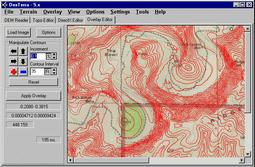 |
Editing Tools. Estierra allows you to edit and cut the
terrain models down to smaller size pieces so you can focus on
your particular area of interest. Also, smaller images are
faster and the smaller files size means that the images can be
more easily manipulated over the internet. Estierra
has special editing tools that allow you easily overlay and
align nonstandard maps and images on top of the terrain models.
This means that with a scanner you can overlay virtually any
type of map or photograph.
More Info:
Editing Tools.
|
|
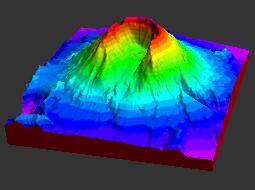 |
Special Color Options. Estierra has special coloring tools
that allow you to color by depth using predefined palletes of
colors or colors of your own choosing. The colors can be set to
irregular or nonlinear spacings. The program will also color
according to the slope of the terrain, placing light rocky
colors on the cliffs and steep mountains sides and greens and
yellows on more level terrain where there is more vegitation.
More Info:
Color Options.
|
|
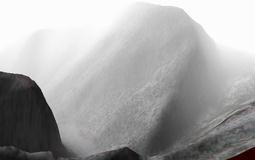 |
Special Effects. In addition to all the other features,
Estierra supports a number of special effects that add extra
realism to the terrain models. For example, you can add
fog
to the scene which fills the canyons and gets thicker as you
look at object further away. This increases the realism and 3D
effect of the terrain.
More Info:
Special
Effects.
|
|
|
|
|

