Problems Downloading and Installing
Compass. Windows and Antivirus programs are now
getting more and more picky about what programs they
will allow to be installed on a computer. Many antivirus
programs rely on the creation date of a program to
determine how safe the program is. New programs are
often flagged as unsafe because so few people have used
them that the antivirus program will be worried
that the file might not have made it into the
virus/malware databases. Since I frequently update
Compass with new features and bug fixes, Compass
programs are often just a few weeks old. As a result,
they are often flagged as suspicious. To help solve this
problem, I have taken two actions:
1. New Installer. The installer I
have used for years was a third party tool that I had
the source code for. That made it easy for me to modify
the installer so it could do anything I wanted. The
problem was that many antivirus programs didn't recognize the
installer and would flag and delete the program as soon
as it was downloaded. I've solve that problem by
switching the
Inno
Setup installer, which is a widely used installer. The
antivirus programs now recognize the installer and
don't automatically remove the program as soon as it is
downloaded.
2. Compass Files Digitally Certified and
Signed. In addition, all Compass executable files are
digitally signed using an
Authenticode Certificate from
Comodo.
Before you can get a certificate, you have to verify your
address and business credentials. Once you have a
certificate, you sign all your executable files with a
code that cannot be forged. The certificate ensures that
the file came from Fountain Computer and that it hasn't
been tampered with. As a result, Antivirus programs are
less likely to flag it and Windows won't warn you about
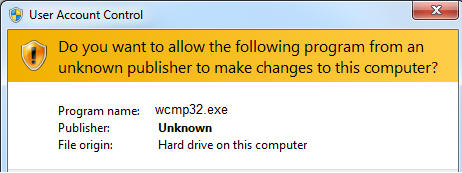
the trustworthiness of the file. For example this is the
type of warning message you get from Windows if a
program isn't signed:
|
 |
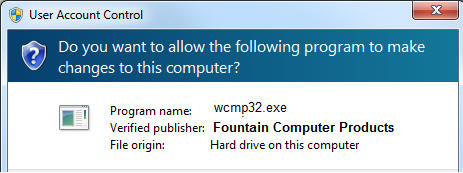
| This shows the same program digitally
signed: |
|
 |
| Likewise, your browser will warn you
if you try to download an unsigned file: |
|
 |
| But the warning will go away if the
file is signed: |
|
 |
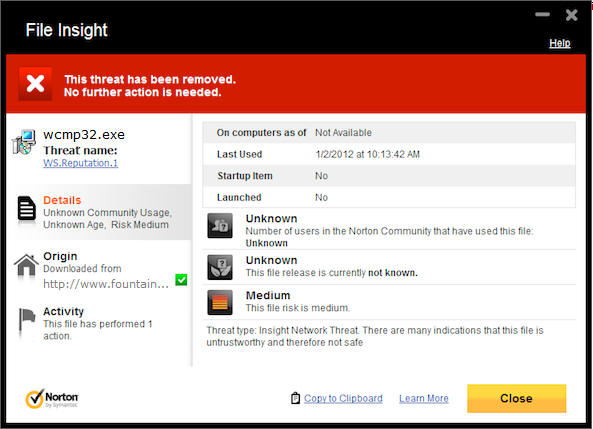
| Worst of all, your antivirus program
may remove the program without any warning: |
|
 |
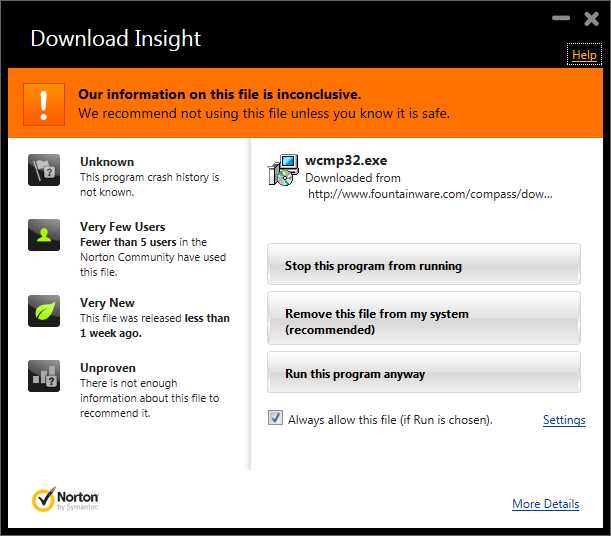
There still may be some issues at
first while the Fountain Computer certificate develops a
reputation, but at least the virus programs won't
automatically remove the program and will offer you the
choice of saving and running the program:
|
|
 |
As the Fountain Computer digital
signature makes it into more databases and develops a
trustworthy reputation, even these problems should fade.
How To Determine If Compass Software
is Safe. If you have any questions about a Compass
file's authenticity, you should verify it before you
attempt to install it. Click
here for instructions.
False Positives. Even with all the
measures I've taken to eliminate download and
installation problems, it is still possible to have
problems. Typically these problems are due to "false
positives. Click here
for detailed information about dealing with this type of
problem. |