Compass Cave Survey Software Logo - Bats, Compass and Night Sky
Custom Search
 
 Sponsored Links


COMPASS For Windows
• Compass Tour
• Other New Features
• Cartography Tools
• Live 3D Cave Images
• On-line Help (New)
• Written Description
• Revision History: 99-21
• Testimonial Letters
• Contact Author
Getting COMPASS
• Getting Compass
•Compass On A CD.
• Previous Versions  (New)
Download/Install Issues
• Installation Instructions
• Antivirus Issues
• Authenticating Files
• False Positives
Registration Information
• Credit Card Reg.
• Reg. Info/Forms
• Printable Reg. Form
• 3rd Party Reg. Form
Auxiliary Tools/Information
• Cave Data
• 3D Glasses
• ESRI/ArcView Tools
Tutorials - (New)
• Inkscape Tips and Tricks
• Radio Locations
• Magnetic Anomalies
• Installing Under Win8
• Compass on Mac/Linux
• Google Earth Overlay
• Declination/Convergence
• Cartography Tools
• Sketch Editor.
• SVG Export
• Inkscape SVG Maps
• Illustrator SVG Maps
• SVG Round Tripping
• Adopting SVG Maps
• Complex Plot Tutorials
• Trouble Shoot CaveX
• Exporting HPGL
• Canvas Digital Map 
• ArcView/ESRI
• Italian Tutorial
• Using the Compass CD
• DEM Tutorial
Links
• Cave Related Links
• User's Pages
• User's Group
• User Questions
Documents/White Papers
• Compass File Formats
• ArcView/ESRI
• Finding Blunders
• Finding Loops
• Loop Closure
• Least Squares Papers
• Least Squares Issues
• Passage Modeling
• Survey Blunders
• J. Halleck- On Loops
• History/Philosophy
• SEF File Format (1992)
• About The Author
COMPASS For DOS
• DOS Compass Demos
• DOS Compass Features
• Magazine Review
MISC.
• Betas
• Other Products


Sections

Sections allow you divide your cave data up into individual sections for selective coloring and viewing. The sections can be individual caves, surface surveys, or subsection of larger caves. Once you have organized the cave into sections, you can then individually highligh, color or exclude the sections. Here is an image of cave system that shows individual caves and surface modeling in different colors.
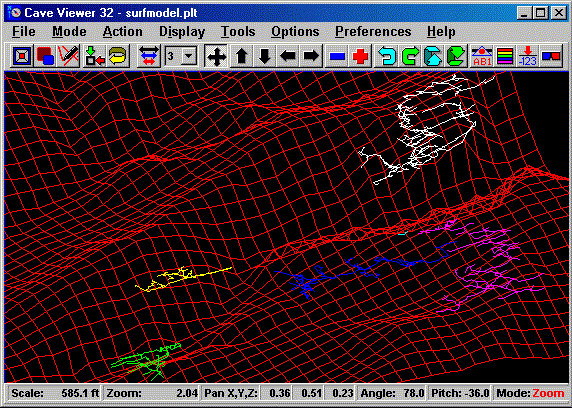
Here the surface is colored red and the individual caves different colors. Some surface surveys have been excluded to make it easy to see the individual caves. This feature makes it easy to view a system of multiple caves and see where each cave begins and end, and how they inter-relate.

 
 Sponsored Links
Sponsored Links
 Sponsored Links
 Sponsored Links

<< Home

Custom Search